

Search Website
Alternative Text and Image Descriptions
Overview
Alternative text, commonly called “Alt Text”, is a hidden description of an image. It is read by assistive reading software, such screen readers, or displayed on the screen when an image fails to load. Alternative text should be applied to all images in documents, presentation slides, course sites, or any other locations that contain visual information.
Image descriptions are longer, detailed, descriptions of images and are generally visible to all users. These are most commonly used to explain complex images or graphics. Image descriptions are generally integrated into the main body text to support readers in making connections across textual and visual elements and content. Ultimately, alternative text and image descriptions function together to support meaning-making, readability, and usability in learning materials.
Rationale
The purpose of alternative text is to describe the relevant parts of an image to ensure that all learners, including those accessing content through a screen reader or other assistive technologies, can access the information conveyed by an image and have an equitable learning experience using those materials. Meanwhile, the purpose of image descriptions is to help explain and connect complex information to all users in both textual and visual modes.
Guidance regarding alternative text is a key consideration in WCAG 1.1 Text Alternatives; AODA Standard 14: Accessible Websites and Web Content; and UDL Consideration 1.2: Support multiple ways to perceive information
Policy/Legislation/Framework References
- WCAG 1.1 Text Alternatives
- AODA Standard 14: Accessible Websites and Web Content
- UDL Consideration 1.2: Support multiple ways to perceive information
Guidance
Alt Text should be concise, contextual and included on all images. Image descriptions should provide more fulsome explanatory details.
Concise
Describe only the relevant information in the image.
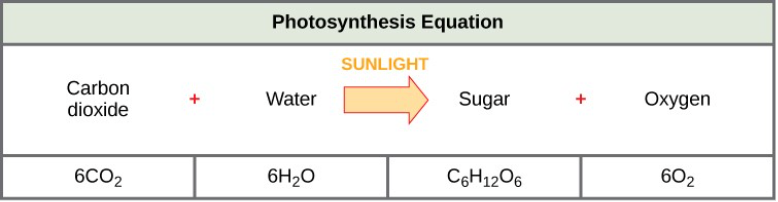
Alt Text: "A chart showing the photosynthesis equation as carbon dioxide plus water plus sunlight creates sugar and oxygen."
Image Description: "The photosynthesis equation shows that six carbon dioxide molecules and six water molecules produce one sugar molecule and one oxygen molecule. The sugar molecule is made of 6 carbons, 12 hydrogens, and 6 oxygens. Sunlight is used as an energy source."
Contextual
Describe the aspects of the image that are important to the specific context in which you’re using it.
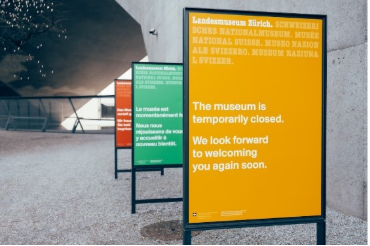
In an article about the underfunding of museums, the alt text for the preceding image might be "Signs stating that the museum is temporarily closed".
In a presentation about multi-lingual heritage sites, the alt text might be "A row of three signs that read 'The museum is temporarily closed. We look forward to welcoming you again soon' in English, French and German."
Recommendations
 Try
Try
- Including important text that appears in the image in the alt text description
- Using inclusive language in your descriptions (see guide below)
- Marking decorative images as "decorative" in the alt text menu or leaving the alt text attribute as null
 Avoid
Avoid
- Starting descriptions with "Image of…" or "Picture of…"
- Describing images that are purely decorative
- Repeating information that appears elsewhere in the content
- Editorializing or including your own opinions or analysis about the image
Resources
Centre for Teaching and Learning. Drafting and integrating alternative text. Access and Accessibility Resources. University of Alberta.
Cesal, A. (2020). Writing alt text for data visualization. Medium.
Microsoft Support. Add alternative text to a shape, picture, SmartArt graphic, or other object.
Web Accessibility Initiative. Alt text decision tree. Design and Develop.
---. Images tutorial. Design and Develop.
Inclusive Language Guide. Western University. https://www.edi.uwo.ca/edi-learning/guides/
(This guide provides practical tools for using inclusive language in written and verbal communication.)